Maths equations in diagrams

You can add maths equations to your diagrams by enabling mathematical typesetting via the draw.io menu. When you enter an equation into a text shape or label, enabling mathematical typesetting will use MathJax to render your equation. MathJax renders equations neatly and works in all browsers.
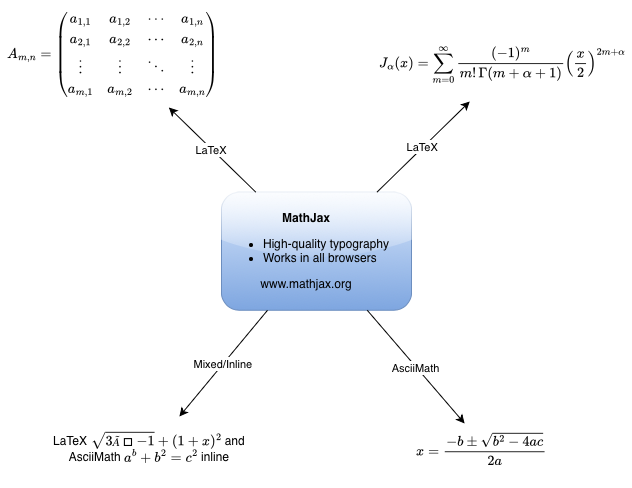
LaTeX and AsciiMath
Input equations using LaTeX or AsciiMath.
- LaTeX inline:
\(\sqrt{3×-1}+(1+x)^2\) - AsciiMath inline:
`a^b + b^2 = c^2` - LaTeX in a block:
$$\sqrt{3×-1}+(1+x)^2$$
You can also mix LaTeX and AsciiMath inline in the one text field: LaTeX \(\sqrt{3×-1}+(1+x)^2\\) and AsciiMath `a^b + b^2 = c^2`
Enable mathematical typesetting
Select Extras > Mathematical Typesetting in the draw.io menu to render your equations in MathJax.You can disable it at any time and see the equation's LaTeX or AsciiMath source through the same menu item.
Maths equations in tables
Just like you can add shapes to table cells, you can also add maths equations to table cells and cross-functional tables.
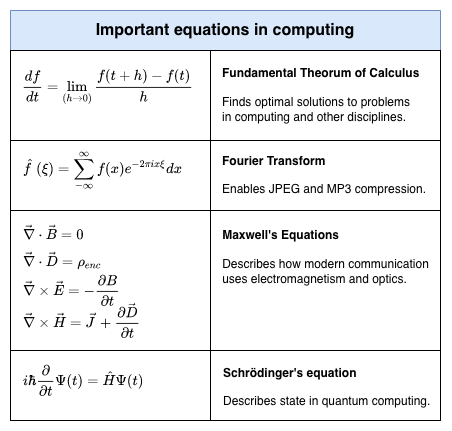
Open these examples in our diagram viewer
Related
See the maths typesetting documentation for changing the maths font, troubleshooting printing or display problems, and more examples.